![[Beginning GIMP: From Novice to Professional, by Akkana Peck]](/images/beginninggimp-wilber.jpg)
Outside GIMP Links
Categories:
Web Articles by the author •
Sources for Freely Usable Images •
GIMP Community Sites •
Useful GIMP Web Sites •
Collections of GIMP tutorials •
Good Tutorials for Specific Projects •
Art Sites and Imaging Contests •
GIMP Brushes and Other Resources •
Collections of GIMP Plug-Ins •
Some Selected GIMP Plug-Ins •
Useful info on writing plug-ins •
Web Articles by the author:
- Image Formats for the Web (and Elsewhere)
- Tips on using a Wacom tablet on Linux
- Tips on Building the GIMP from Source
An Online GIMP Course which was offered in 2005 via LinuxChix.
Video of a 90-minute GIMP tutorial I gave at LinuxConf AU 2007: available as a downloadable Ogg Theora file (see the Ogg FAQ for how to play Ogg Theora on Windows and Mac), or as a Java based stream.
GIMP plug-ins and scripts by the author.
Outside Links
Sources for Freely Usable Images
Public domain or Creative Commons licensed images.These are the links mentioned in Chapter 12 of the book, plus recent additions since the second edition was published.
General Photos
- Wikimedia Commons
- The Public Domain Image Archive, a curated collection of out-of-copyright historical images
- Pexels
- Burning Well
- Unsplash: Free (do whatever you want) high-resolution photos
- Pixabay
- Public.Work
- Good Free Photos: Free Photos (Public Domain Photos), Clipart, images, and Vectors
- OpenPhoto.net
- PD Photo
- Free Images
- Morgue File
- Smithsonian Open Access
- New York Public Library Digital Collections
- Creative Commons Openverse
US Government sites:
- US Fish and Wildlife Service
- NOAA (National Oceanic and Atmospheric Administration)
- National Park Service
- Library of Congress Free-to-use portal
- Smithsonian Open Access
NASA and Space Images:
- NASA NSSDC Photo Gallery
- JPL Planetary Photojournal
- NASA Image of the Day Gallery
- NIX: NASA's comprehensive image archive
- Apollo Image Catalog
Artwork:
- (US) National Gallery of Art (or alternate link)
- Art Institute of Chicago
- Getty Open Content content availabloe under a Creative Commons Zero (CC0) license (or alternate link)
- The Metropolitan Museum of Art high-res images, most in the public domain
- British Museum collection of images licensed under Creative Commons 4.0
- Rijksmuseum (may require registering for an account)
Flickr Searchers
- Biodiversity Heritage Library's Flickr -- historic artwork, mostly animals and plants, provided by the
- PhotoPin -- search Flickr for CC-licensed images
- Compfight -- another site that searches Flickr for CC-licensed images
- Or do a Google image search, click on Tools and then Usage Rights and choose an appropriate license.
GIMP Community Sites
for sharing artwork, tips etc. Most of these have tutorial sections, and there's a lot of overlap between this list and the list of tutorial sites, below.Useful GIMP Web Sites
- GIMP.org, home of all things GIMPish
- GIMP 2.4: The new features, a fairly up-to-date list of changes from 2.2 to 2.4
- Digital Image Representation, a discussion of different image formats and the difference between raster and vector images.
- Tools on flamingtext.com Lots of weird and neat uses of GIMP.
- GUG: Gimp User Group
- Gimp Cheat Sheet in PDF
- Blending Modes
- Edge Detection in GIMP A comparison of the various different ways to do edge detection
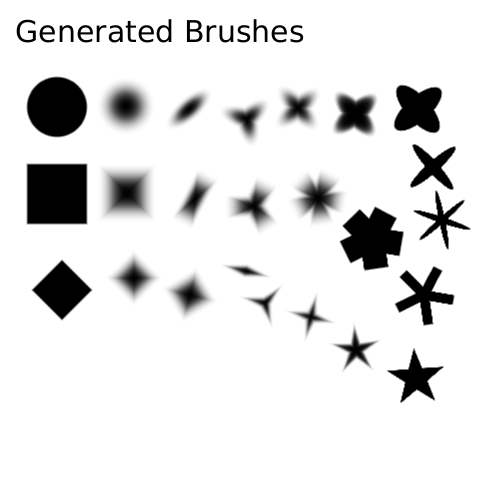
- Examples of parametric brushes
- The author's page on Linux and Open Source Imaging.
Collections of GIMP tutorials
- GIMP.org tutorials
- WinGIMP tutorials (useful tutorials no matter what platform you use)
- GIMP Guru
- GIMPtutorials.net
- TheGIMPTutorials.com
- Text Effects for GIMP
- GUG GIMP tutorials (this site is down a lot. If it doesn't answer, check back later)
- GIMP tutorials on urveillance-video.com
- Tigert Labs tutorials
- Meet the GIMP video podcast tutorials
- gimpology.com
- Gimp Talk: a web forum for sharing GIMP tips
- GIMPusers
- Art Tutorials Wiki, a huge collection of pointers to tutorials on digital art (both GIMP and other programs) plus some original tutorials
Good Tutorials for Specific Projects
- Changing Sky Color by decomposing into H, S, and V layers. (This is unfortunately gone now, but you can get the text from the internet archive).
- Recompose the Sky, a newer tutorial based on the same technique.
- Masking hair with fine strands using the Channel Mixer
- Making rotateable animated brushes with GAP
- How to scan colour images from old books, with Gimp, in 18 easy steps showing decomposition into CMYK and back
- Scanning: How to Fix Colour Registration Errors
- How To Draw Cartoons from Scratch
- Getting Started with The GIMP: an informal tutorial
- CMYK Support in the GIMP on the Arch Linux wiki
- Glass and Plastic letters (in German)
- Making a Contrast Mask
- HDR with GIMP which also links to this Luminous Landscape PS tutorial.
- gimp-perl for animation post-processing
Art Sites and Imaging Contests
- GUG: the GIMP User Group
- Deviant Art
- Photoshop Contest (don't worry, you can use GIMP too)
- Worth 1000 such as this wonderful collection of animal hybrids
- SomethingAwful's 'Photoshop Phriday'
Collections of GIMP Brushes and Other Resources
- The Vault: GIMP brushes for painting (acrylics, pastels etc.)
- Helen's Images brushes -- the best set of naturalistic brushes (grass, bushes, etc.) I've found
Collections of GIMP Plug-Ins
- GIMP Plug-In Registry It's not always up to date, but it's worth searching here first.
- A static copy of the old GIMP Plug-in Registry
- GIMP FX Foundary
- GIMP Plug-ins @ Sourceforge
- Lasm's FX Effects for Gimp for photo manipulation
- IPX Plug-ins oriented toward image analysis, e.g. sharpening, edge detection
Some Selected GIMP Plug-Ins
- Resynthesizer helps in removing objects from a complicated textured background.
- GREYCstoration can remove noise from a photo, or cartoonify a photo.
- Exposure Blend for combining images with lighter and darker exposure to make a simulate HDR image
- Focus Blur lets you create all kinds of interesting effects simulating shallow depth of field.
- GAP: the GIMP Animation Package for making movies far beyond the simple animated GIF in Chapter 3.
- David's Batch Processor lets you make simple changes (rotate, crop, scale etc.) to a bunch of images at once.